
Document Object Model (DOM)
What is Document Object Model (DOM)?
The DOM (Document Object Model) is a programming interface for web documents. It represents the structure of an HTML or XML document as a tree of objects, allowing developers to interact with and manipulate the content, structure, and style of a webpage dynamically using JavaScript.
Key Features of the DOM:
Tree Structure:
- The DOM represents the document as a tree of nodes, where each node corresponds to an element, attribute, or piece of text in the document.
Example:
#html
<html>
<body>
<h1>Hello, World!</h1>
<p>This is a paragraph.</p>
</body>
</html>
is represented in the DOM as:
Document
└── html
└── body
├── h1
│ └── "Hello, World!"
└── p
└── "This is a paragraph."
Nodes:
The DOM consists of different types of nodes:
- Element Nodes: Represent HTML elements (e.g.,
<h1>,<p>). - Text Nodes: Represent the text inside elements.
- Attribute Nodes: Represent attributes of elements (e.g.,
class,id).
Dynamic Interaction:
- JavaScript can be used to dynamically manipulate the DOM, such as adding, removing, or modifying elements and their attributes.
Event Handling:
- The DOM allows developers to attach event listeners to elements, enabling interactivity (e.g., handling clicks, form submissions, etc.).
One of the best feature of React is it render page based on Virtual DOM rather than Real DOM.
To move further in this course we should know how Virtual DOM works
What is the Virtual DOM?
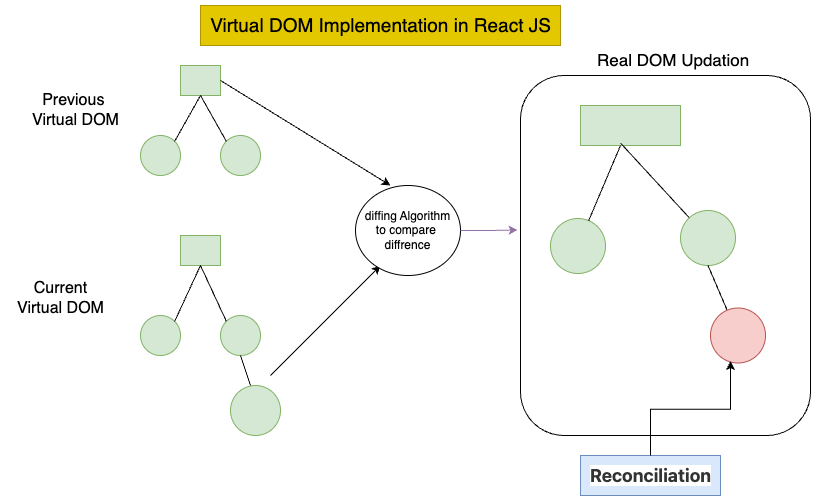
The Virtual DOM is a programming concept where a virtual representation of the UI is kept in memory and synced with the Real DOM through a process called reconciliation. Instead of directly manipulating the Real DOM, React uses the Virtual DOM to determine the minimal number of changes required to update the UI efficiently.
How the Virtual DOM Works in React
The Virtual DOM implementation in React can be broken down into the following steps:
- Rendering the Virtual DOM:
- When a React component is rendered, React creates a Virtual DOM tree that mirrors the structure of the Real DOM.
- This Virtual DOM is a JavaScript object that represents the UI elements and their properties.
- Updating the Virtual DOM:
- When the state or props of a component change, React creates a new Virtual DOM tree to represent the updated UI.
- This new Virtual DOM tree is compared with the previous Virtual DOM tree to identify the differences.
- Diffing Algorithm:
- React uses a highly optimized diffing algorithm to compare the old and new Virtual DOM trees.
- The algorithm identifies the minimal set of changes (e.g., adding, removing, or updating elements) required to update the Real DOM.
- Reconciliation:
- After identifying the changes, React updates only the parts of the Real DOM that have changed, rather than re-rendering the entire UI.
- This process is called reconciliation, and it ensures that updates are efficient and fast.
Virtual DOM in Action
Here’s a simple example to demonstrate how the Virtual DOM works in React:
import React, { useState } from 'react';
function Counter() {
const [count, setCount] = useState(0);
const increment = () => {
setCount(count + 1);
};
return (
<div>
<h1>Counter: {count}</h1>
<button onClick={increment}>Increment</button>
</div>
);
}
export default Counter;
How the Virtual DOM Works in This Example:
When the Counter component is rendered for the first time, React creates a Virtual DOM tree representing the initial UI:
{
type: 'div',
props: {
children: [
{ type:'h1', props: { children:'Counter: 0' } },
{ type:'button', props: { onClick:increment, children:'Increment' } }
]
}
}
When the user clicks the "Increment" button, the count state is updated, and React creates a new Virtual DOM tree:
{
type: 'div',
props: {
children: [
        { type:'h1', props: { children:'Counter: 1' } },
        { type:'button', props: { onClick:increment, children:'Increment' } }
      ]
    }
  }
React compares the new Virtual DOM tree with the previous one and identifies that only the text inside the
<h1>element has changed.React updates only the
<h1>element in the Real DOM, leaving the rest of the DOM untouched.
Advantages of the Virtual DOM
- Improved Performance:
- By updating only the parts of the DOM that have changed, the Virtual DOM reduces the overhead of manipulating the Real DOM.
- Predictable Updates:
- React's declarative approach and Virtual DOM ensure that UI updates are predictable and consistent.
- Simplified Development:
- Developers can focus on writing declarative UI code without worrying about manually updating the DOM.
- Cross-Browser Optimization:
- The Virtual DOM abstracts away browser-specific details, providing a consistent experience across different environments.