
Amazon EC2 basics
Amazon Elastic Compute Cloud (EC2) provides virtual servers—called instances—that you can launch, configure, and scale on demand. You choose an image to boot from, a hardware profile, storage, and networking, then deploy applications with full OS-level control.
Core concepts
An Amazon Machine Image (AMI) is the boot template that defines the operating system and optional software. AMIs are region-specific and can be copied across regions. Instance types define virtual hardware (vCPU, memory, storage, network). Families include general purpose, compute optimized, memory optimized, storage optimized, and accelerated computing. Newer “g” types use AWS Graviton (ARM) CPUs for strong price-performance if your software supports arm64.
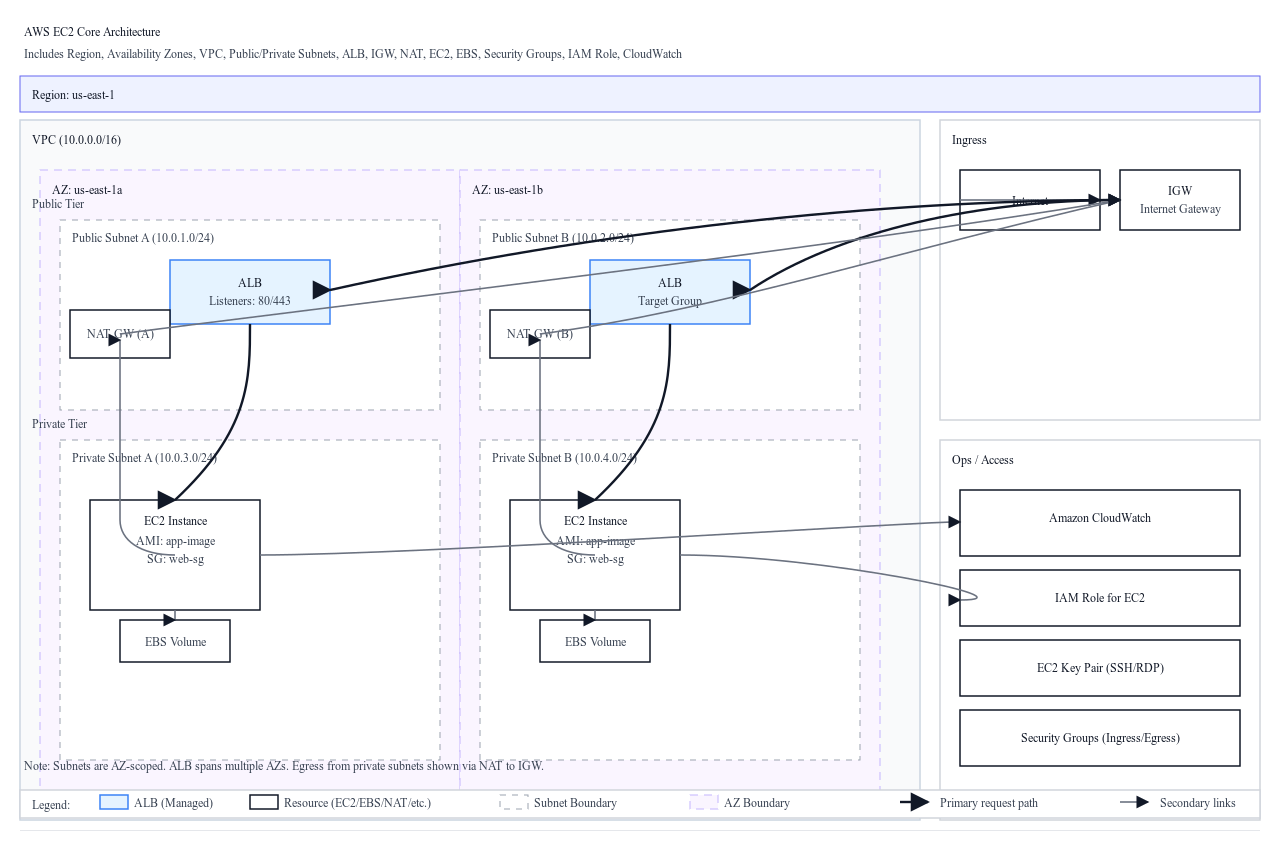
EC2 runs inside a Virtual Private Cloud (VPC). You place instances in subnets within specific Availability Zones. Public subnets route to an Internet Gateway, while private subnets do not; use a NAT Gateway for private instances that need outbound internet. Each instance has a primary private IP; you can assign a public IP in public subnets. Elastic IPs are static public IPs you control at the account and region level.
Security Groups are stateful firewalls attached to network interfaces. They allow inbound rules and automatically allow return traffic. Network ACLs are stateless filters applied at the subnet level and support explicit deny and allow.
Storage
Elastic Block Store (EBS) is network-attached block storage that persists independently of the instance lifecycle. Common volume types are gp3 (general purpose), io1/io2 (provisioned IOPS), and st1/sc1 (HDD, throughput-oriented). Snapshots are incremental, region-bound copies of volumes; you can copy snapshots across regions and create AMIs from them.
Instance store is physically attached, very fast ephemeral storage. It is ideal for caches, buffers, and temporary data. Data on instance store is lost when you stop or terminate the instance; it survives only reboots.
For shared files, pair EC2 with EFS (managed NFS for Linux) or FSx families (e.g., Lustre, Windows File Server).
Access and identity
You connect to Linux via SSH and to Windows typically via RDP. Key pairs generate the credentials for initial access; you cannot retrieve a lost private key. Prefer using AWS Systems Manager Session Manager to access instances without opening inbound SSH/RDP, provided the SSM agent and IAM role are configured.
Attach IAM roles to instances to grant temporary credentials for AWS APIs. Applications obtain these credentials via the Instance Metadata Service; IMDSv2 (session-based) is recommended for security.
Lifecycle and operations
The typical lifecycle is pending, running, stopping or stopped (EBS-backed only), and terminated. Stopping preserves EBS volumes; terminating deletes the instance and, by default, the root volume unless you disable delete-on-termination. Hibernate writes RAM to the encrypted root EBS volume and resumes faster than a cold start on supported types and sizes.
To resize, stop the instance, change the instance type, and start it again (ensure the AZ has capacity and that the new type is compatible). You can attach/detach additional EBS volumes at runtime. For backups, create EBS snapshots or bake a new AMI. To move across AZs or VPCs, create an AMI or snapshot and relaunch in the target location.
Availability and scaling
Use multiple AZs for high availability. Place instances behind a load balancer: Application Load Balancer for HTTP/HTTPS with path/host-based routing, Network Load Balancer for ultra-low latency TCP/UDP and static IPs. Auto Scaling groups (ASGs) manage fleets: define a launch template, desired/min/max capacity, health checks, and scaling policies. Target tracking policies are the most common and adjust capacity to keep a metric (for example, CPU at 50%) at a target value.
Placement groups influence how instances are arranged: cluster (low-latency within one AZ for HPC), spread (max seven per AZ to isolate critical instances), and partition (isolate across partitions for large distributed systems like Hadoop).
Pricing models
On-Demand instances offer maximum flexibility. Savings Plans and Reserved Instances reduce cost with a usage or capacity commitment. Spot Instances are heavily discounted but can be interrupted with two minutes’ notice; use them for fault-tolerant, stateless, or batch workloads. Dedicated Hosts/Instances provide hardware isolation for compliance and licensing needs.
Monitoring and logging
CloudWatch provides default metrics (for example, CPU). Enable detailed monitoring for one-minute granularity, and install the CloudWatch Agent to collect memory and disk metrics. Send OS and application logs to CloudWatch Logs. VPC Flow Logs record network metadata for troubleshooting.