
AWS Global Accelerator
AWS Global Accelerator is a networking service that improves the availability and performance of your applications for global users. It provides two static anycast IP addresses that act as a fixed entry point to your application. User traffic enters the AWS edge network at the nearest point of presence, travels across the AWS global backbone, and is routed to healthy regional endpoints.
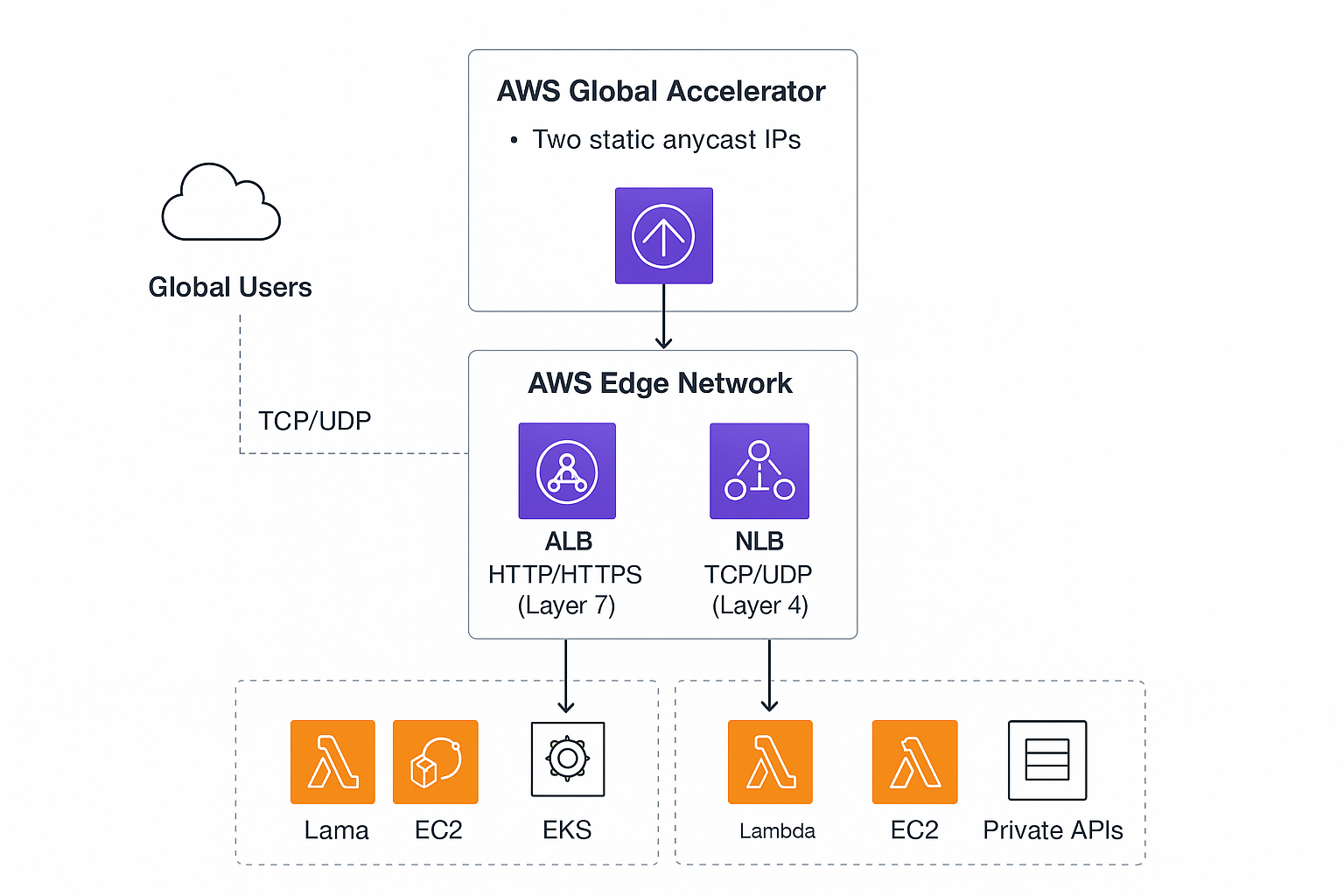
AWS Global Accelerator Key concepts
- Listener: Accepts client traffic on a port/protocol pair (TCP/UDP).
- Endpoint group: A group of regional endpoints for a listener. Each endpoint group maps to a single AWS region.
- Endpoint: The target resource in a region (Network Load Balancer, Application Load Balancer, EC2 instance, or Elastic IP).
- Traffic Dial: Controls the percentage of traffic sent to an endpoint group (useful for gradual rollouts or failover).
- Health checks: Built-in health checks ensure traffic is routed only to healthy endpoints.
What it does
- Provides static anycast IP addresses as a global fixed entry point.
- Routes users to the optimal region using AWS’s global network to reduce latency and jitter.
- Automatically fails over to healthy endpoints in other regions during regional outages.
- Integrates with AWS Shield for DDoS protection and with CloudWatch for metrics.
Primary benefits
- Lower and more consistent latency for global users by using the AWS network backbone.
- Improved availability via cross-region failover.
- Simpler DNS and client configuration using static IPs (no DNS change required during failover).
- Fine-grained traffic control with traffic dials for progressive rollouts or regional capacity control.
Common use cases
- Global web or API front ends requiring stable IP addresses and low latency.
- Real-time and stateful applications (gaming, interactive apps, VoIP) that benefit from reduced packet loss and jitter.
- Multi-region active/standby or active/active architectures where rapid failover is required.
- Enterprises needing fixed IP allowlists for firewalls or third-party partners.
How it compares with CloudFront and Route 53
- CloudFront is a CDN that caches and serves HTTP(S) content at the edge and supports edge compute (Lambda@Edge / Functions). Use CloudFront for cacheable content and HTTP-level edge logic.
- Route 53 is DNS-based routing with sophisticated policies (latency, geolocation, weighted). It operates at DNS resolution time and is slower for failover decisions.
- Global Accelerator uses anycast IPs and the AWS global network to route individual connections for better TCP/UDP performance and faster failover. Use it when you need static IPs, lower transport-layer latency, or deterministic failover.
Best practices
- Use Global Accelerator in front of global regional endpoints (NLB/ALB/EC2) and combine with CloudFront only when you have distinct needs (cache + acceleration).
- Configure health checks with appropriate thresholds and endpoints.
- Use traffic dials for staged traffic shifts and capacity control.
- Keep security in mind: use TLS/ECDHE at your application layer and integrate with AWS WAF on ALB or CloudFront where needed.
- Monitor CloudWatch metrics (ClientLatency, HealthyEndpointCount, FlowCount) and set alarms for unusual changes.
Quick CLI example (high level)
Create an accelerator:
aws globalaccelerator create-accelerator \
--name my-accelerator \
--ip-address-type IPV4 \
--enabled
Create a listener and an endpoint group (simplified):
# create listener (TCP port 443)
aws globalaccelerator create-listener \
--accelerator-arn <accelerator-arn> \
--protocol TCP \
--port-ranges FromPort=443,ToPort=443
# create endpoint group in us-east-1 pointing to an NLB
aws globalaccelerator create-endpoint-group\
--listener-arn<listener-arn>\
--endpoint-group-regionus-east-1\
--endpoint-configurations EndpointId=<nlb-arn-or-eip>,Weight=128
When not to use Global Accelerator
-
- When your traffic is purely static, cacheable HTTP content and CloudFront already satisfies latency and caching needs.
- For simple DNS-based routing where DNS-level policies (Route 53) are sufficient and static IPs aren’t required.